

Fast Facts
- The "Clickfix" attack exploits public Wi-Fi by redirecting users to fake portals that mimic legitimate networks and use CAPTCHA to deceive victims into downloading malware.
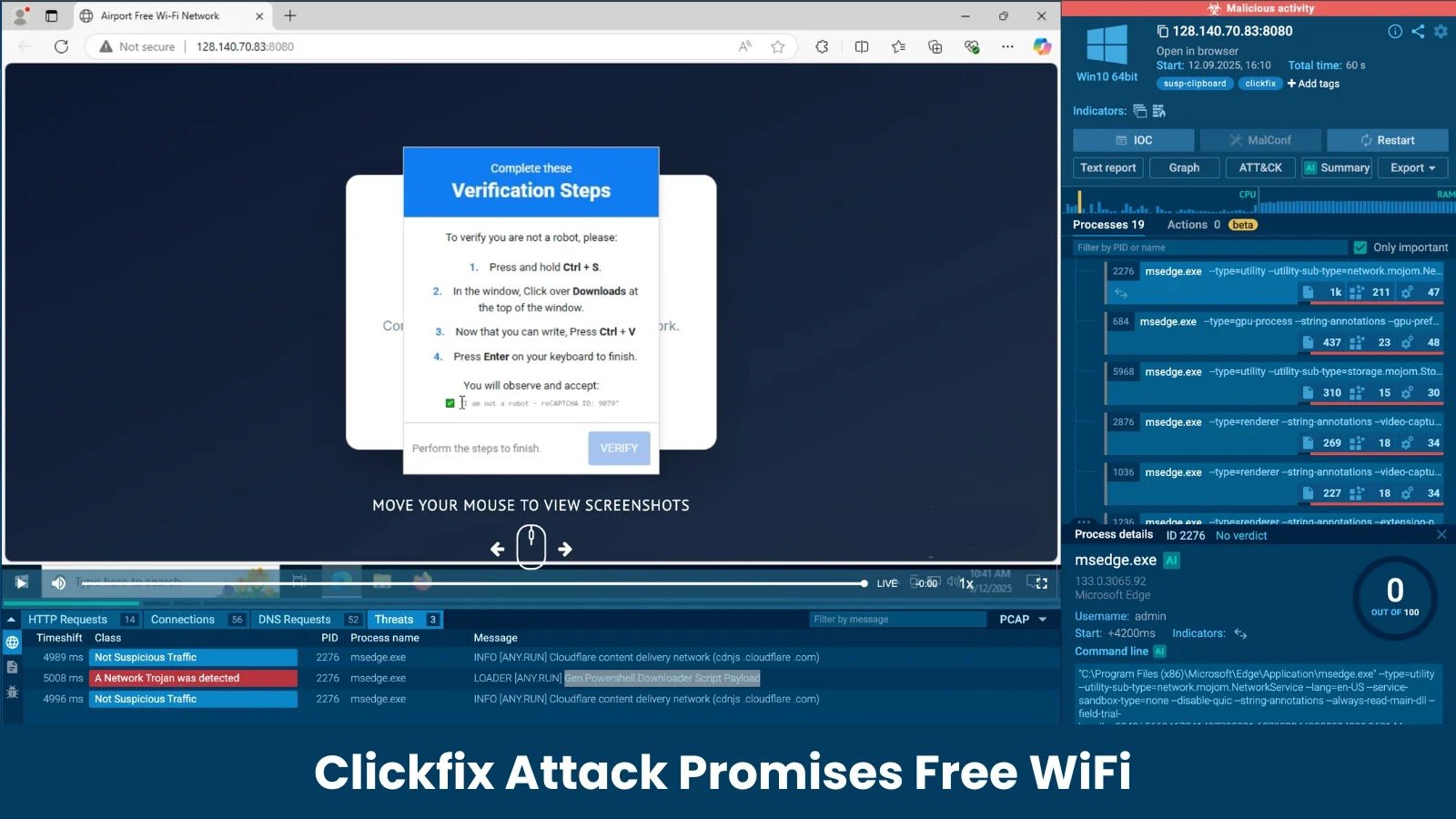
- After user interaction, it prompts for keyboard shortcuts (e.g., Ctrl+S, Enter) to bypass security warnings and execute malicious PowerShell scripts covertly.
- The malware payload, a network trojan, is downloaded via a script that connects to command servers, capable of data theft, ransomware, or establishing remote backdoors.
- Users should be cautious on public Wi-Fi, scrutinize URLs, and avoid executing files involving unusual keyboard commands to prevent infection.
Problem Explained
The cybersecurity research team has uncovered a sophisticated social engineering scheme called the “Clickfix” attack, which exploits people’s reliance on free Wi-Fi in public areas like airports. In this scam, users are lured by fake, professionally designed login pages that mimic legitimate networks, tricking them into interacting with deceptive verification steps. When users attempt to follow these steps—specifically, pressing keyboard shortcuts such as Ctrl+S and navigating downloads—they inadvertently authorize the download and execution of a malicious PowerShell script. This script connects to a remote command-and-control server to fetch a payload, often a network trojan, granting attackers persistent access to the infected device and enabling malicious activities like data theft or ransomware deployment.
Why this happens is tied to the attackers’ strategic use of social engineering to bypass typical security warnings, leveraging trusted user behaviors against them. The scheme is reported by the cybersecurity researchers, who used advanced sandbox analysis tools to reveal how the malware, integrated into Windows via PowerShell, can operate stealthily and evade standard detection methods. Vulnerable users who connect to insecure, fake Wi-Fi portals and follow unusual prompts are at risk of unwittingly fueling this attack, emphasizing the importance of vigilance when using public networks and scrutinizing the authenticity of login pages.
Risks Involved
The “Clickfix” attack exemplifies a potent cyber risk by exploiting public Wi-Fi connections, especially in busy areas like airports, through sophisticated social engineering tactics that manipulate user trust and behavior. It employs fake, professionally crafted captive portals that mimic legitimate login pages, luring users into unwittingly executing malware by following deceptive verification steps involving keyboard shortcuts, such as saving and opening malicious scripts. Once executed, these scripts deploy PowerShell-based malware that connects to command-and-control servers, enabling a range of malicious activities—such as data theft, ransomware deployment, or establishing backdoors—while often bypassing traditional security defenses due to their script-based, fileless nature. This attack highlights the vulnerabilities inherent in unsecured networks and underscores the critical need for heightened user awareness, cautious verification of website legitimacy, and robust cybersecurity measures to mitigate the growing threat landscape.
Fix & Mitigation
Identifying and addressing the threat posed by the "New Clickfix Attack Promises ‘Free WiFi’ But Delivers Powershell Based Malware" promptly is crucial to preventing further damage, safeguarding user data, and maintaining overall network integrity. Delayed response can allow the malware to spread, compromise sensitive information, and weaken system defenses.
Containment Measures
Immediately isolate affected systems from the network to prevent malware propagation.
Malware Detection
Run comprehensive antivirus and anti-malware scans using updated signatures to identify and remove malicious software.
System Updates
Apply all relevant security patches and updates to close vulnerabilities exploited by the malware.
Credential Review
Change passwords and review access controls to prevent unauthorized access resulting from malware compromise.
User Notification
Inform users about the incident, advising caution regarding suspicious links or communications.
Traffic Monitoring
Enhance network monitoring to detect unusual activity or command-and-control communication indicative of malware actions.
Restoration & Verification
Restore affected systems from clean backups and verify their integrity before reconnecting to the network.
Incident Documentation
Document the incident thoroughly for future analysis and to improve future response strategies.
Security Awareness
Conduct training sessions to promote awareness about phishing tactics and safe online practices to reduce susceptibility.
Stay Ahead in Cybersecurity
Stay informed on the latest Threat Intelligence and Cyberattacks.
Access world-class cyber research and guidance from IEEE.
Disclaimer: The information provided may not always be accurate or up to date. Please do your own research, as the cybersecurity landscape evolves rapidly. Intended for secondary references purposes only.
Cyberattacks-V1
