

Fast Facts
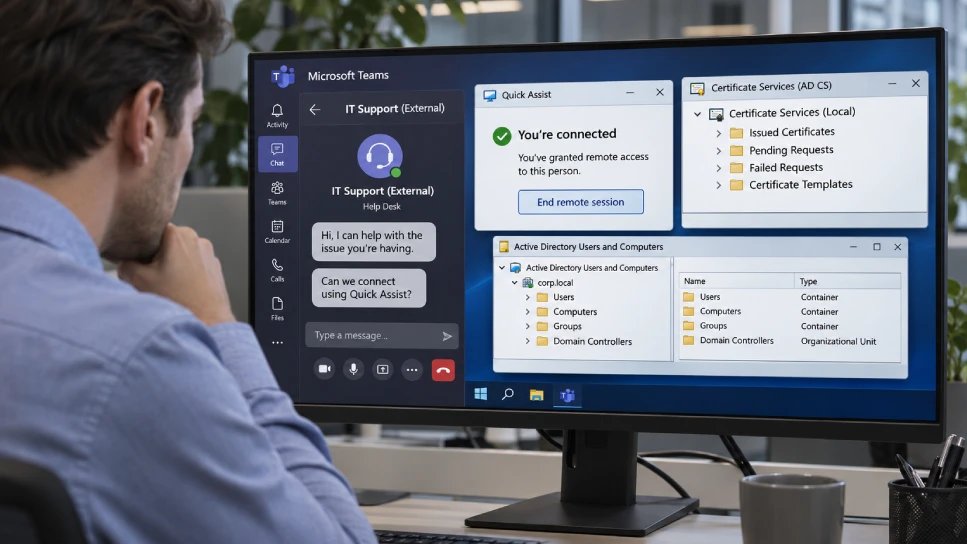
- Fake IT support opened the door: Attackers used Microsoft Teams and Quick Assist to gain hands-on control of employees’ PCs—without exploiting a Teams flaw.
- Misconfigured AD CS enabled privilege escalation: ESC1 and ESC8 techniques let attackers obtain certificates for privileged accounts, including a domain controller.
- One intrusion led to credential theft attempts and data theft: A missed containment exception left an account active; another attack was stopped by isolating a workstation.
- Harden identity systems and close response gaps: Review certificate templates and enrollment endpoints, verify support requests, audit certificates, and ensure every excluded account has a manual containment plan.
Familiar Support Requests Opened the Door
Attackers posing as company IT staff used Microsoft Teams to persuade employees to share control of their computers, Microsoft reported. They contacted workers from outside accounts with support-themed names, then asked them to open Quick Assist, a Windows remote-help tool, and read out a connection code.
The attackers used that access to run malicious files and target weaknesses in Active Directory Certificate Services (AD CS), which issues digital certificates that help verify identities. In simple terms, a certificate can function like a trusted login credential. Poorly configured settings let attackers obtain certificates for privileged accounts, including a domain controller.
Microsoft investigated two intrusions. In the first, attackers gained certificates for multiple privileged accounts and accessed a domain controller. Security tools blocked much of their activity, but one account escaped automatic containment. The attackers used it to reach a file server and copy company data to an external server. Microsoft did not say how much data they took.
In the second intrusion, attackers used a different certificate weakness to impersonate a domain controller. This time, the company isolated the affected workstation, and Microsoft reported no further activity. The incidents did not exploit a flaw in Teams, and Microsoft did not link them to a known group.
Verification and Configuration Matter
The cases show how everyday tools can become attack paths when people trust an unexpected support request. Remote assistance can help teams solve problems quickly, but employees should confirm surprise requests through a known internal channel before sharing screen access.
Organizations should also review who can request identity certificates and tighten unsafe AD CS settings. Microsoft recommends securing certificate web-enrollment services, monitoring certificate activity, and ensuring every privileged account has a clear containment plan. Resetting a password or wiping a computer may not end access if an attacker still holds a valid certificate or login ticket.
These steps require careful setup, but they build on tools and controls many companies already use. As remote work and digital support become routine, pairing convenience with verification can help protect both employees and company data.
Discover More Technology Insights
Stay informed on the revolutionary breakthroughs in Quantum Computing research.
Discover archived knowledge and digital history on the Internet Archive.
DataProtection-V1
