

Summary Points
- Cybercriminals are exploiting Microsoft Teams’ trusted status by impersonating IT support to trick employees into granting remote access, leading to malware infections.
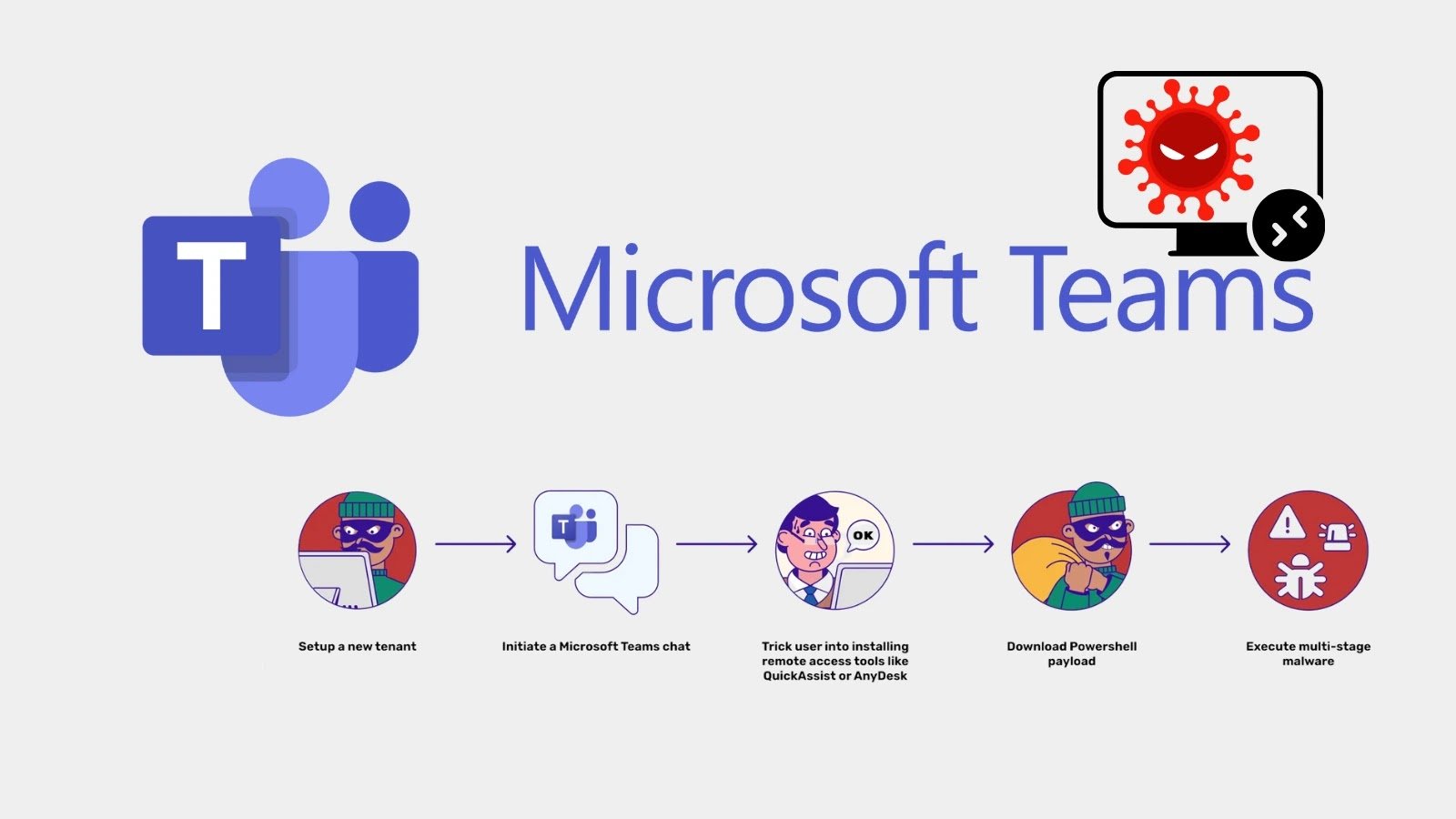
- Attackers craft convincing messages from fake accounts using verified-like symbols, then persuade users to install remote tools like QuickAssist or AnyDesk, giving direct access.
- Once inside, they deploy sophisticated PowerShell malware—such as DarkGate and Matanbuchus—that can steal credentials, establish persistence, and evade detection by designating critical processes.
- To defend, organizations must combine technical security measures with user training, emphasizing verification of requests through separate channels to prevent social engineering and malware campaigns.
What’s the Problem?
Cybercriminals are increasingly exploiting Microsoft Teams, a trusted platform for corporate communication, to launch sophisticated social engineering attacks. These threat actors impersonate IT support staff by creating convincing profiles using familiar display names and icons, such as checkmarks to appear verified, in order to establish trust with employees. Once trust is gained, they persuade users to install remote access software like QuickAssist or AnyDesk under false pretenses, granting hackers a direct foothold into individual systems and, potentially, the entire corporate network. Using this access, attackers deploy PowerShell-based malware payloads—such as DarkGate and Matanbuchus—that can steal credentials, establish persistence, and execute remote commands, all while evading detection through tactics like marking processes as “critical” or tricking users into revealing passwords via legitimate-looking prompts. These campaigns, linked to the financially motivated threat group Water Gamayun, highlight a dangerous evolution in cyberattacks, emphasizing the importance of employee vigilance and a layered security approach that combines technical defenses with ongoing user awareness to prevent internal platform exploitation.
What’s at Stake?
Cybercriminals are increasingly exploiting Microsoft Teams’ trusted role in corporate communication by impersonating IT support staff to carry out sophisticated social engineering attacks, tricking employees into granting remote system access. These campaigns often begin with seemingly legitimate messages from fake accounts designed to mimic organizational personnel, leveraging trust and platform familiarity to build rapport. Once trust is established, employees are persuaded to install remote access tools like QuickAssist or AnyDesk, providing attackers with direct access to sensitive networks. Attackers deploy advanced malware, such as DarkGate and Matanbuchus loaders, executing PowerShell commands to steal credentials, establish persistence, and remotely control systems, all while using tactics to evade detection—like designating processes as “critical” or mimicking legitimate prompts. These threats are linked to well-known financially motivated groups, making the consequences potentially catastrophic, including data theft, system crashes, and ransomware deployment. To mitigate these risks, organizations must implement layered security measures, combining technical defenses with ongoing user training to recognize and verify suspicious communications and requests, thereby preventing misuse of trusted collaboration tools as vectors for cyberattacks.
Fix & Mitigation
Timely remediation is crucial in the face of evolving cyber threats, especially when hackers exploit platforms like Microsoft Teams to deploy PowerShell-based malware. Rapid identification and intervention can prevent widespread compromise, protect sensitive data, and maintain organizational integrity.
Mitigation Steps
- Enhanced Monitoring: Implement continuous monitoring of network traffic and user activities within Microsoft Teams and related systems to detect abnormal behaviors indicative of malware activity.
- Security Patches: Ensure all software and systems, including Microsoft Teams and PowerShell, are updated with the latest security patches to mitigate known vulnerabilities.
- User Training: Conduct regular security awareness training to educate employees about phishing tactics and suspicious activity associated with malware campaigns.
- Access Controls: Enforce strict access controls and multi-factor authentication (MFA) to limit unauthorized access to critical systems and communication channels.
- Behavior Analysis: Deploy advanced endpoint detection and response (EDR) solutions to identify and isolate malicious PowerShell scripts or abnormal processes.
- Incident Response Plan: Prepare and rehearse an incident response plan specific to malware infections involving communication platforms to ensure rapid containment and eradication.
- Network Segmentation: Segment networks to contain potential breaches and prevent lateral movement of malware within the organization.
- Communication Isolation: Temporarily disable or restrict access to compromised Teams channels to halt malware propagation and protect users from further infection.
Advance Your Cyber Knowledge
Discover cutting-edge developments in Emerging Tech and industry Insights.
Understand foundational security frameworks via NIST CSF on Wikipedia.
Disclaimer: The information provided may not always be accurate or up to date. Please do your own research, as the cybersecurity landscape evolves rapidly. Intended for secondary references purposes only.
Cyberattacks-V1
